
L1, L2, L3 IT Support Explained: How MSPs Can Scale Faster and Reduce Downtime
- Manoj Kumar
- April 1, 2026
- MSP Blog
- 0
In today’s fast-paced digital world, businesses can’t afford IT downtime, slow support, or unresolved technical issues. Whether you’re a startup or an established enterprise, having a structured IT support system is no longer optional—it’s critical.
Managing IT issues without a structured system can lead to downtime, inefficiencies, and frustrated clients—especially for MSPs handling multiple environments. This is where proactive IT management through 24/7 NOC support services becomes critical for maintaining uptime and performance.
Imagine This…
It’s 9:00 AM.
Your client’s team logs in—and suddenly, nothing works.
Emails are down. Systems are slow. Users are locked out.
Within minutes, your support queue explodes with tickets.
Now comes the real challenge:
Who handles what?
If your IT support isn’t structured, chaos takes over. Senior engineers get stuck fixing password resets, while critical issues wait.
This is exactly why the L1, L2, and L3 IT support model exists.
But here’s the problem: many businesses either don’t understand these support tiers or fail to implement them properly. This leads to delays, inefficiencies, frustrated employees, and lost revenue.
And if you’re an MSP looking to scale, improve SLAs, and reduce costs—understanding this model isn’t optional. It’s essential.
In this guide, you’ll learn:
Want to streamline your IT support today? Keep reading—and discover how to build a scalable, efficient support system.
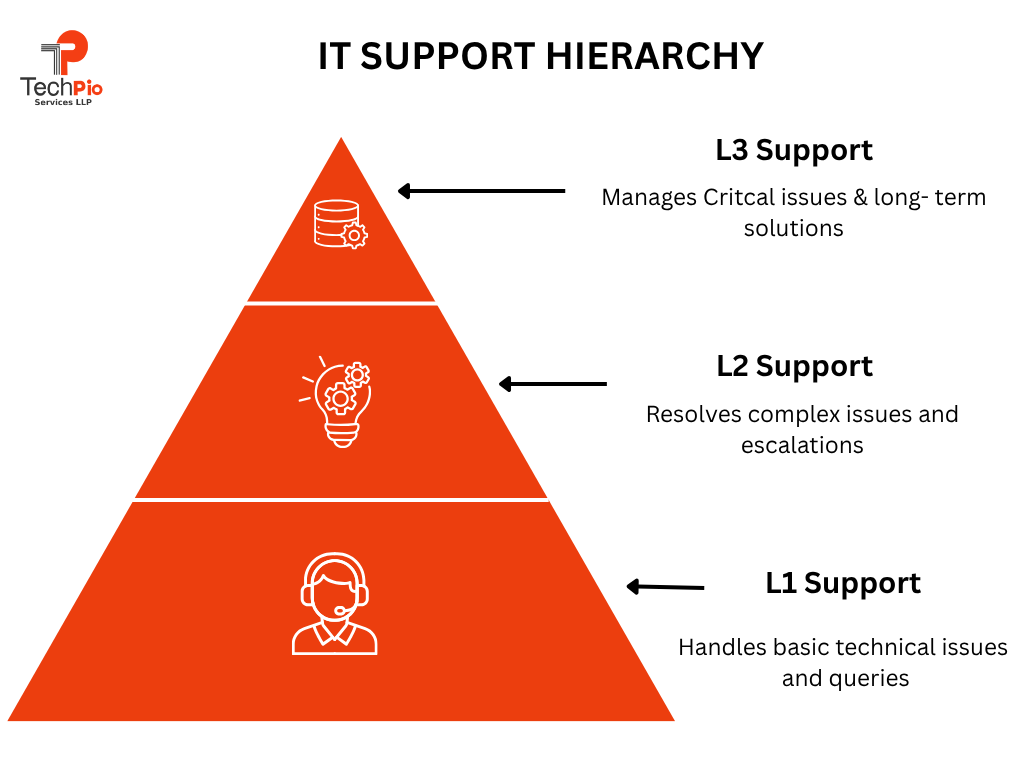
L1, L2, and L3 support is a tiered IT support system that organizes issues based on complexity and assigns them to the right level of expertise.
Here’s the simple breakdown:
L1 Support (Level 1 – First Line Support): L1 support is the first point of contact for users facing IT issues. This level handles basic and common problems that can be resolved quickly without deep technical knowledge.
Typical tasks include password resets, assisting with login issues, guiding users through simple troubleshooting steps, and creating support tickets.
The main goal of L1 is to provide quick resolutions for routine issues and ensure a smooth user experience. If the issue is beyond their scope, it is escalated to the next level.
Why L1 is Critical:
Around 60–70% of IT issues are basic and can be resolved at this level.
If L1 is strong:
The Problem Most MSPs Face:
L1 teams often:
L2 Support (Level 2 – Technical Support): L2 support deals with more complex technical issues that L1 cannot resolve. These professionals have a deeper understanding of systems, applications, and networks.
They analyze problems, perform advanced troubleshooting, and work on issues like software bugs, system errors, or network failures.
L2 support often uses diagnostic tools and logs to identify root causes. If the problem still cannot be fixed, it is escalated to L3 for expert intervention.
Why L2 Matters:
L2 ensures:
• Faster resolution of complex issues
• Reduced escalation to L3
• Better system performance
Real Example:
A client reports that backups are failing.
L3 Support (Level 3 – Expert Support): L3 support is the highest level of technical expertise within the IT support structure. This level includes highly skilled engineers, developers, or specialists who handle critical and complex issues.
They are responsible for resolving problems that require code-level fixes, infrastructure changes, or advanced system redesign. L3 support also works on long-term solutions, product improvements, and root cause analysis to prevent recurring issues.
Real Example:
A server crashes repeatedly.
• L1 logs the issue
• L2 attempts fix but fails
• L3 identifies memory leak, applies patch, prevents future crashes
Instead of one team handling everything, this structure ensures:
• Faster issue resolution
• Better resource utilization
• Improved customer experience
Think of IT support as the backbone of your business operations—the silent force that keeps everything running smoothly behind the scenes. From fixing a simple login issue to managing complex cloud infrastructure, IT support ensures your team stays productive and your systems stay secure.
In today’s digital-first environment, even a few minutes of downtime can lead to lost revenue, missed opportunities, and frustrated employees. That’s why having a reliable IT support system isn’t just helpful—it’s essential.
Whether it’s troubleshooting a slow computer, securing your network from cyber threats, or maintaining critical business applications, IT support acts as your organization’s first line of defense and problem-solving engine.
IT support teams wear many hats to keep your business running efficiently. Here are some of their core responsibilities:
Not all IT support is the same. Depending on your business needs, different types of support can be used:
Why This Matters: A strong IT support system doesn’t just fix problems—it prevents them, boosts productivity, and gives your business the confidence to scale without technical roadblocks.
Looking to upgrade your IT support experience? The right strategy and a reliable partner offering managed IT support services for MSPs can completely transform how your business operates.
Pro Tip: Businesses that outsource IT support reduce operational costs by up to 30% while improving efficiency.
In a world where every business relies on technology—emails, cloud apps, CRMs, cybersecurity tools—IT is no longer just a “support function.” It’s the backbone of your entire operation.
Yet, many businesses only realize the importance of IT support when something breaks: systems go down, data is lost, or employees can’t work. That reactive approach is costly.
A proactive IT support system ensures your business runs smoothly, securely, and without interruption—so you can focus on growth instead of fixing problems.
5 Reasons Your Business Needs IT Support
Why It Matters
Without proper IT support, businesses often face hidden costs and operational chaos. Small issues can quickly turn into major disruptions if left unresolved. A structured IT support system—especially one built on L1, L2, & L3 IT Support—ensures that every issue is handled at the right level, quickly and efficiently.
Real-World Example
Imagine your CRM system crashes during peak business hours:
Setting up a tiered IT support system isn’t just about assigning roles—it’s about building a streamlined process that improves efficiency, speeds up resolution times, and enhances user experience.
Many MSPs rely on expert RMM consulting services to properly configure monitoring, automation, and ticketing workflows.
1. Define Each Support Level Clearly
Start by outlining what types of issues belong to L1, L2, and L3.
Clear definitions prevent confusion and unnecessary escalations.
2. Assign the Right Talent to Each Tier
Match skill levels with responsibilities.
3. Implement a Ticketing System
Use a centralized help desk or ticketing system to:
This creates visibility and accountability across all support levels.
________________________________________
4. Create a Strong Escalation Process
Define when and how issues should move from L1 to L2 or L3.
For example:
A clear escalation path avoids delays and improves response time.
5. Build a Knowledge Base
Document common issues and solutions so L1 teams can resolve more tickets without escalation.
This reduces workload on higher tiers and speeds up resolutions.
________________________________________
6. Monitor Performance and Optimize
Track key metrics such as:
Pro Tip: A well-implemented tiered IT support system can reduce resolution time by up to 50% and significantly improve customer satisfaction.
L1 Support (First Line Support): L1 is the first point of contact for users.
Responsibilities:
Example: A user can’t log in → L1 resets password
Skills Required:
L2 Support (Technical Support): L2 handles more complex issues that L1 cannot resolve.
Responsibilities:
Example: Application crashes repeatedly → L2 investigates logs
Skills Required:
L3 Support (Expert Support): L3 is the highest level, consisting of experts or developers.
Responsibilities:
Example: A software bug → L3 developers fix the code
Skills Required:
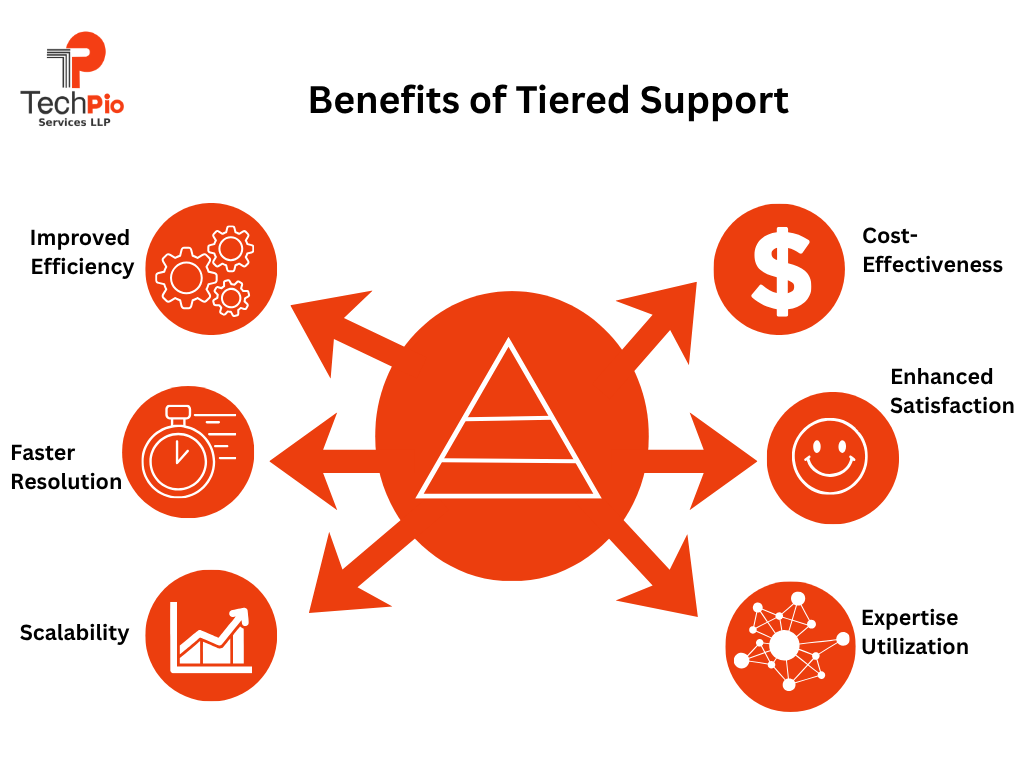
A slow or unstructured IT support system can quietly drain your business—leading to lost productivity, frustrated employees, and unresolved technical issues.
That’s why implementing L1, L2, & L3 IT Support through a tiered help desk model is a game-changer. Instead of a one-size-fits-all approach, each issue is routed to the right level of expertise, ensuring faster and more efficient resolution.
The result? A smoother IT experience, improved performance, and a system that scales as your business grows.
Benefits of Help Desk Support Tiers
Pro Tip: A well-structured help desk tier system not only solves problems faster—but also prevents them from happening again.
Even the most well-structured L1, L2, & L3 IT Support system can fail if it’s not backed by the right strategies.
Many businesses assume that simply dividing support into tiers is enough—but in reality, poor communication, lack of documentation, and inefficient workflows can slow everything down.
The difference between average IT support and a high-performing one lies in how well each level operates and collaborates.
1. Clear Documentation: Maintain a knowledge base for faster resolution.
2. Automation: Automate repetitive tasks like password resets.
3. Training & Skill Development: Regularly train support staff.
4. Use Advanced Tools: Leverage RMM, ticketing systems, and monitoring tools.
5. Performance Tracking: Measure KPIs like:
IT support is no longer just about fixing issues after they happen—it’s about predicting, preventing, and resolving problems faster than ever before.
As businesses become more dependent on technology, traditional support models are evolving into smarter, more proactive systems. The rise of automation, cloud computing, and cybersecurity has completely transformed how L1, L2, & L3 IT Support operates.
In this section, we’ll explore the key trends reshaping tiered IT support—and how your business can leverage them to stay ahead of downtime, reduce costs, and deliver a seamless user experience.
1. AI-Powered Support (Chatbots Handling L1 Queries)
Artificial Intelligence is revolutionizing L1 support, which typically handles repetitive and time-consuming tasks.
2. Remote Monitoring & Management (RMM) (Proactive Issue Detection)
RMM tools are transforming IT support from reactive to proactive.
How It Works:
RMM systems continuously monitor:
• Servers
• Networks
• Endpoints
• Applications
They detect issues before users even notice them.
Key Capabilities:
• Real-time alerts
• Automated patch management
• Performance monitoring
• Remote troubleshooting
Why It Matters:
• Prevents downtime
• Improves system performance
• Reduces emergency support tickets
Example:
An RMM tool detects high CPU usage on a server and resolves it automatically before it crashes.
Business Impact: Less downtime, higher productivity, and smoother operations.
3. Cloud-Based Support Systems (Scalable & Flexible Infrastructure): Cloud technology is making IT support more agile and scalable than ever.
4. Cybersecurity Integration (Security at Every Level): Cybersecurity is no longer limited to specialized teams—it’s now integrated into every layer of IT support.
5. Self-Service Portals (Users Solving Issues Independently): Modern users prefer solving simple problems on their own—and self-service portals make that possible.
Insight: By 2027, over 60% of IT support interactions are expected to be automated.
________________________________________
If your IT team is constantly overwhelmed with tickets, slow resolutions, and repeated issues, it’s a clear sign that your support system needs structure.
Implementing a tiered IT support model (L1, L2, & L3 IT Support) helps you bring order to the chaos—ensuring the right issues are handled by the right experts at the right time. The result?
Faster resolutions, happier users, and a more scalable IT operation.
Key Steps:
Even with a structured L1, L2, & L3 IT Support system in place, many businesses struggle due to avoidable mistakes. These issues can slow down resolution times, increase costs, and frustrate users.
Here are the most common mistakes—and how to avoid them:
Pro Tip: A successful L1–L2–L3 support system isn’t just about structure—it’s about continuous improvement, communication, and smart use of technology.
Building a high-performing L1, L2, & L3 IT Support system isn’t just about hiring a few technicians—it’s about creating a well-orchestrated ecosystem of people, processes, and technology that works seamlessly together.
Many businesses struggle with delayed responses, unresolved tickets, and rising IT costs simply because their support structure isn’t optimized. That’s exactly where TechPIO Services makes a difference.
With deep expertise in managed IT operations, TechPIO helps businesses design and implement a scalable, efficient, and proactive support system tailored to their needs.
From handling day-to-day support requests to managing complex infrastructure challenges, their team ensures every issue is addressed at the right level—quickly and effectively.
Conclusion: In today’s fast-moving digital world, businesses can’t afford slow or unstructured IT support.
Implementing L1, L2, & L3 IT Support ensures faster resolutions, reduced downtime, better user experience, and lower costs.
But the real impact comes from doing it right—with clear processes and continuous optimization to keep your systems running at peak performance.
Ready to streamline your IT operations and improve SLA performance?
Discover how TechPIO Services can optimize your L1, L2, & L3 IT support structure and help you scale faster.
L1, L2, & L3 IT Support is a tiered system designed to resolve IT issues based on their complexity and required expertise.
This structure ensures that every issue is resolved efficiently without overloading senior experts.
A tiered IT support system is critical because it brings structure, speed, and scalability to your IT operations. Instead of every issue going to one team, requests are filtered and resolved at the appropriate level.
Key benefits include:
In short, it helps your business run smoother while keeping IT costs under control.
L1 support focuses on quick wins and common issues that users face daily.
Typical examples include:
Think of L1 as your “frontline support team” that resolves most issues instantly or routes them correctly.
Implementing a successful tiered IT support system requires more than just assigning roles—it requires strategy and the right tools.
Here’s how to do it:
1. Clearly define responsibilities for each support level
2. Implement a robust ticketing/help desk system
3. Create clear escalation workflows
4. Build a knowledge base for faster resolutions
5. Train your team regularly
6. Track performance metrics like response time and resolution rate
Businesses often partner with experts like TechPIO Services to streamline this process and avoid costly mistakes.
Absolutely! In fact, small businesses can benefit even more from a structured support system.
Why it works for small businesses:
Many small businesses choose to outsource tiered IT support to reduce costs while gaining access to experienced professionals.
While often used interchangeably, they are slightly different:
In simple terms, the help desk is the “entry point,” while tiered support is the “engine” that drives resolution.
Tiered IT support helps businesses save money by ensuring that high-cost experts only handle complex issues.
Cost-saving advantages:
This optimized resource allocation reduces unnecessary expenses and improves ROI.
Modern IT support relies on advanced tools to improve efficiency and automation.
Common tools include:
The right combination of tools can significantly improve response time and user satisfaction.
To ensure your L1, L2, & L3 IT Support system is performing well, track key metrics such as:
Regular monitoring helps you continuously improve and optimize your support operations.
Both options have their advantages, but outsourcing is often more cost-effective and scalable.
Outsourcing benefits:
Partnering with providers like TechPIO Services allows businesses to focus on growth while experts handle IT support efficiently.