
In today’s fast-paced digital world, businesses can’t afford IT downtime, slow support, or unresolved technical issues. Whether you’re a startup or an established enterprise, having a structured IT support system is no longer optional—it’s critical.
Managing IT issues without a structured system can lead to downtime, inefficiencies, and frustrated clients—especially for MSPs handling multiple environments. This is where proactive IT management through 24/7 NOC support services becomes critical for maintaining uptime and performance.
Imagine This…
It’s 9:00 AM.
Your client’s team logs in—and suddenly, nothing works.
Emails are down. Systems are slow. Users are locked out.
Within minutes, your support queue explodes with tickets.
Now comes the real challenge:
Who handles what?
If your IT support isn’t structured, chaos takes over. Senior engineers get stuck fixing password resets, while critical issues wait.
This is exactly why the L1, L2, and L3 IT support model exists.
But here’s the problem: many businesses either don’t understand these support tiers or fail to implement them properly. This leads to delays, inefficiencies, frustrated employees, and lost revenue.
And if you’re an MSP looking to scale, improve SLAs, and reduce costs—understanding this model isn’t optional. It’s essential.
In this guide, you’ll learn:
- What L1, L2, & L3 IT support really means
- How each tier works (with real examples)
- Why your business needs a tiered IT support system
- Best practices and trends shaping the future
- How to implement it effectively
Want to streamline your IT support today? Keep reading—and discover how to build a scalable, efficient support system.
What are the L1, L2, L3 IT Support?
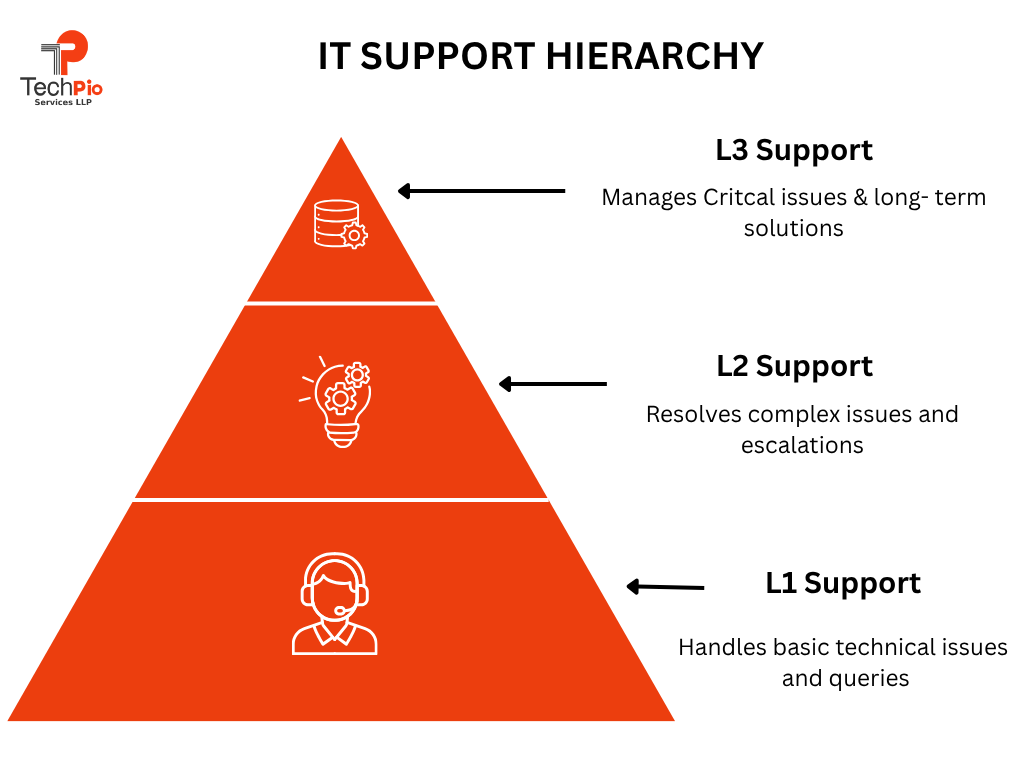
L1, L2, and L3 support is a tiered IT support system that organizes issues based on complexity and assigns them to the right level of expertise.
Here’s the simple breakdown:
L1 Support (Level 1 – First Line Support): L1 support is the first point of contact for users facing IT issues. This level handles basic and common problems that can be resolved quickly without deep technical knowledge.
Typical tasks include password resets, assisting with login issues, guiding users through simple troubleshooting steps, and creating support tickets.
The main goal of L1 is to provide quick resolutions for routine issues and ensure a smooth user experience. If the issue is beyond their scope, it is escalated to the next level.
Why L1 is Critical:
Around 60–70% of IT issues are basic and can be resolved at this level.
If L1 is strong:
- Tickets get resolved faster
- L2 and L3 teams stay focused on complex work
- Customers get quick responses
The Problem Most MSPs Face:
L1 teams often:
- Lack proper training
- Don’t have documentation
- Get overwhelmed with repetitive tasks
L2 Support (Level 2 – Technical Support): L2 support deals with more complex technical issues that L1 cannot resolve. These professionals have a deeper understanding of systems, applications, and networks.
They analyze problems, perform advanced troubleshooting, and work on issues like software bugs, system errors, or network failures.
L2 support often uses diagnostic tools and logs to identify root causes. If the problem still cannot be fixed, it is escalated to L3 for expert intervention.
Why L2 Matters:
L2 ensures:
• Faster resolution of complex issues
• Reduced escalation to L3
• Better system performance
Real Example:
A client reports that backups are failing.
- L1 logs the issue
- L2 checks logs, identifies storage issues, fixes configuration
- Problem solved without escalation
L3 Support (Level 3 – Expert Support): L3 support is the highest level of technical expertise within the IT support structure. This level includes highly skilled engineers, developers, or specialists who handle critical and complex issues.
They are responsible for resolving problems that require code-level fixes, infrastructure changes, or advanced system redesign. L3 support also works on long-term solutions, product improvements, and root cause analysis to prevent recurring issues.
Real Example:
A server crashes repeatedly.
• L1 logs the issue
• L2 attempts fix but fails
• L3 identifies memory leak, applies patch, prevents future crashes
Instead of one team handling everything, this structure ensures:
• Faster issue resolution
• Better resource utilization
• Improved customer experience
What is IT Support?
Think of IT support as the backbone of your business operations—the silent force that keeps everything running smoothly behind the scenes. From fixing a simple login issue to managing complex cloud infrastructure, IT support ensures your team stays productive and your systems stay secure.
In today’s digital-first environment, even a few minutes of downtime can lead to lost revenue, missed opportunities, and frustrated employees. That’s why having a reliable IT support system isn’t just helpful—it’s essential.
Whether it’s troubleshooting a slow computer, securing your network from cyber threats, or maintaining critical business applications, IT support acts as your organization’s first line of defense and problem-solving engine.
Key Responsibilities of IT Support
IT support teams wear many hats to keep your business running efficiently. Here are some of their core responsibilities:
- Troubleshooting Technical Issues: Quickly identifying and resolving hardware, software, or network problems to minimize downtime.
- System Maintenance & Monitoring: Regularly updating systems, monitoring performance, and preventing issues before they occur.
- User Support & Assistance: Helping employees with day-to-day IT challenges like login errors, software usage, or device setup.
- Cybersecurity Management: Protecting systems from malware, phishing attacks, and unauthorized access.
- Data Backup & Recovery: Ensuring critical business data is safely backed up and can be restored in case of failure.
- Infrastructure Management: Managing servers, networks, cloud platforms, and overall IT environment.
Types of IT Support
Not all IT support is the same. Depending on your business needs, different types of support can be used:
- Help Desk Support: The first point of contact for users facing basic issues like password resets or login problems.
- Remote IT Support: Technicians resolve issues remotely using secure tools—fast, efficient, and cost-effective.
- On-Site Support: For hardware or complex issues that require physical presence.
- Managed IT Services: Outsourcing your IT operations to experts who proactively manage and maintain your systems.
- Proactive IT Support (Monitoring & Maintenance): Identifying and fixing issues before they impact your business.
Why This Matters: A strong IT support system doesn’t just fix problems—it prevents them, boosts productivity, and gives your business the confidence to scale without technical roadblocks.
Looking to upgrade your IT support experience? The right strategy and a reliable partner offering managed IT support services for MSPs can completely transform how your business operates.
Pro Tip: Businesses that outsource IT support reduce operational costs by up to 30% while improving efficiency.
Why Does Your Business Need IT Support?
In a world where every business relies on technology—emails, cloud apps, CRMs, cybersecurity tools—IT is no longer just a “support function.” It’s the backbone of your entire operation.
Yet, many businesses only realize the importance of IT support when something breaks: systems go down, data is lost, or employees can’t work. That reactive approach is costly.
A proactive IT support system ensures your business runs smoothly, securely, and without interruption—so you can focus on growth instead of fixing problems.
5 Reasons Your Business Needs IT Support
- Minimize Downtime: Even a few minutes of downtime can cost money and damage your reputation. IT support ensures quick resolution and proactive monitoring.
- Boost Productivity: Employees work efficiently when systems run smoothly without technical interruptions.
- Strengthen Cybersecurity: With rising cyber threats, IT support helps protect your data, systems, and customer information.
- Enable Scalability: As your business grows, IT support ensures your infrastructure scales seamlessly.
- Improve Customer Experience: Faster systems and fewer disruptions lead to better service delivery and happier clients.
Why It Matters
Without proper IT support, businesses often face hidden costs and operational chaos. Small issues can quickly turn into major disruptions if left unresolved. A structured IT support system—especially one built on L1, L2, & L3 IT Support—ensures that every issue is handled at the right level, quickly and efficiently.
- Reduced operational risk
- Faster issue resolution times
- Lower long-term IT costs
- Better decision-making with stable systems
Real-World Example
Imagine your CRM system crashes during peak business hours:
- Without support → hours of downtime
- With L1/L2/L3 → issue escalated and resolved quickly
How to Set Up Tiered IT Support
Setting up a tiered IT support system isn’t just about assigning roles—it’s about building a streamlined process that improves efficiency, speeds up resolution times, and enhances user experience.
Many MSPs rely on expert RMM consulting services to properly configure monitoring, automation, and ticketing workflows.
1. Define Each Support Level Clearly
Start by outlining what types of issues belong to L1, L2, and L3.
- L1: Basic queries and common issues
- L2: Technical troubleshooting
- L3: Advanced or specialized problems
Clear definitions prevent confusion and unnecessary escalations.
2. Assign the Right Talent to Each Tier
Match skill levels with responsibilities.
- L1 agents should excel in communication and basic troubleshooting
- L2 technicians need deeper technical knowledge
- L3 experts should have advanced expertise or development skills
This ensures every issue is handled efficiently.
3. Implement a Ticketing System
Use a centralized help desk or ticketing system to:
- Track issues
- Assign tasks
- Monitor progress
This creates visibility and accountability across all support levels.
________________________________________
4. Create a Strong Escalation Process
Define when and how issues should move from L1 to L2 or L3.
For example:
- If unresolved within a set time → escalate
- If complexity increases → escalate
A clear escalation path avoids delays and improves response time.
5. Build a Knowledge Base
Document common issues and solutions so L1 teams can resolve more tickets without escalation.
This reduces workload on higher tiers and speeds up resolutions.
________________________________________
6. Monitor Performance and Optimize
Track key metrics such as:
- First response time
- Resolution time
- Ticket volume
Use this data to continuously improve your support system.
Pro Tip: A well-implemented tiered IT support system can reduce resolution time by up to 50% and significantly improve customer satisfaction.
IT Support Tiers: L1, L2, L3
L1 Support (First Line Support): L1 is the first point of contact for users.
Responsibilities:
- Password resets
- Basic troubleshooting
- Ticket logging
- FAQs and known issues
Example: A user can’t log in → L1 resets password
Skills Required:
- Basic technical knowledge
- Communication skills
L2 Support (Technical Support): L2 handles more complex issues that L1 cannot resolve.
Responsibilities:
- Software issues
- Network troubleshooting
- System errors
Example: Application crashes repeatedly → L2 investigates logs
Skills Required:
- Deeper technical expertise
- Problem-solving skills
L3 Support (Expert Support): L3 is the highest level, consisting of experts or developers.
Responsibilities:
- Advanced system issues
- Code-level fixes
- Infrastructure redesign
Example: A software bug → L3 developers fix the code
Skills Required:
- Specialized knowledge
- Engineering expertise
Benefits of Help Desk Support Tiers
A slow or unstructured IT support system can quietly drain your business—leading to lost productivity, frustrated employees, and unresolved technical issues.
That’s why implementing L1, L2, & L3 IT Support through a tiered help desk model is a game-changer. Instead of a one-size-fits-all approach, each issue is routed to the right level of expertise, ensuring faster and more efficient resolution.
The result? A smoother IT experience, improved performance, and a system that scales as your business grows.
Benefits of Help Desk Support Tiers
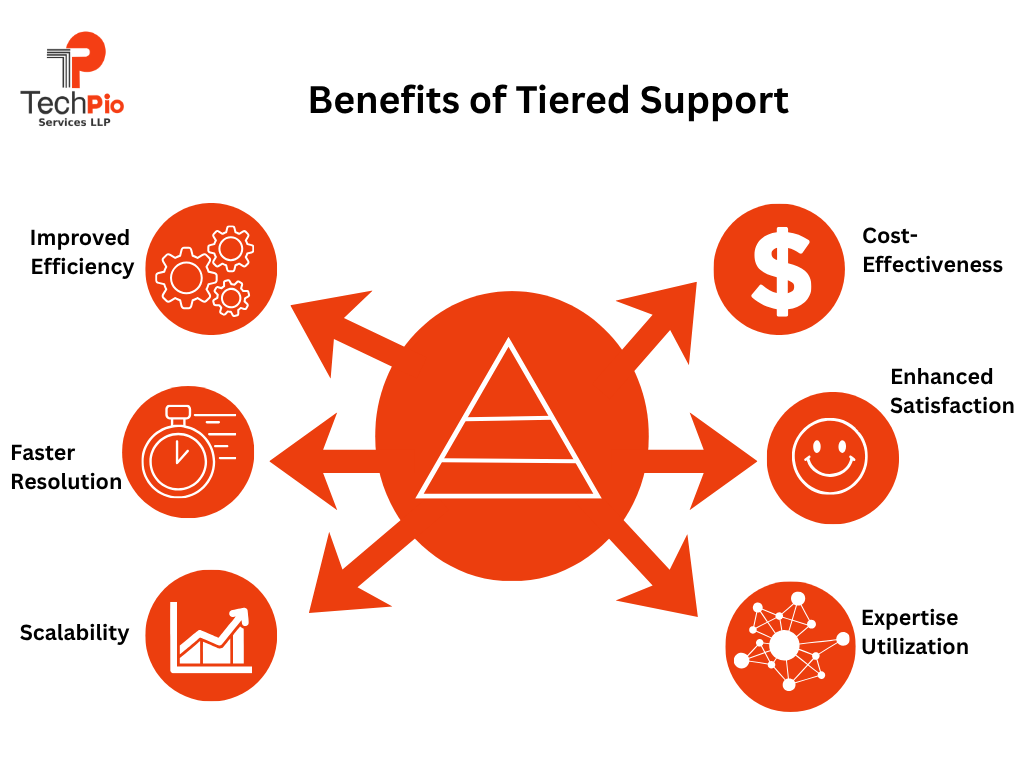
- Faster Issue Resolution: Each problem is handled by the appropriate support level, reducing delays and improving response times.
- Improved Efficiency: L1 handles basic issues, allowing L2 and L3 experts to focus on complex problems—maximizing productivity.
- Cost Optimization: Avoid overusing highly skilled (and expensive) resources for simple tasks, reducing operational costs.
- Better User Experience: Quick and accurate resolutions lead to higher employee satisfaction and better overall experience.
- Scalability: As your business grows, a tiered system can easily expand without disrupting operations.
- Enhanced Accountability: Clear roles and responsibilities ensure every issue is tracked and resolved properly.
- Proactive Issue Management: With proper systems in place, recurring issues can be identified and resolved before they escalate.
Pro Tip: A well-structured help desk tier system not only solves problems faster—but also prevents them from happening again.
L1, L2, L3 Support Best Practices
Even the most well-structured L1, L2, & L3 IT Support system can fail if it’s not backed by the right strategies.
Many businesses assume that simply dividing support into tiers is enough—but in reality, poor communication, lack of documentation, and inefficient workflows can slow everything down.
The difference between average IT support and a high-performing one lies in how well each level operates and collaborates.
1. Clear Documentation: Maintain a knowledge base for faster resolution.
2. Automation: Automate repetitive tasks like password resets.
3. Training & Skill Development: Regularly train support staff.
4. Use Advanced Tools: Leverage RMM, ticketing systems, and monitoring tools.
5. Performance Tracking: Measure KPIs like:
- First response time
- Resolution time
- Ticket backlog
Emerging Trends in IT Tiered Support
IT support is no longer just about fixing issues after they happen—it’s about predicting, preventing, and resolving problems faster than ever before.
As businesses become more dependent on technology, traditional support models are evolving into smarter, more proactive systems. The rise of automation, cloud computing, and cybersecurity has completely transformed how L1, L2, & L3 IT Support operates.
In this section, we’ll explore the key trends reshaping tiered IT support—and how your business can leverage them to stay ahead of downtime, reduce costs, and deliver a seamless user experience.
1. AI-Powered Support (Chatbots Handling L1 Queries)
Artificial Intelligence is revolutionizing L1 support, which typically handles repetitive and time-consuming tasks.
2. Remote Monitoring & Management (RMM) (Proactive Issue Detection)
RMM tools are transforming IT support from reactive to proactive.
How It Works:
RMM systems continuously monitor:
• Servers
• Networks
• Endpoints
• Applications
They detect issues before users even notice them.
Key Capabilities:
• Real-time alerts
• Automated patch management
• Performance monitoring
• Remote troubleshooting
Why It Matters:
• Prevents downtime
• Improves system performance
• Reduces emergency support tickets
Example:
An RMM tool detects high CPU usage on a server and resolves it automatically before it crashes.
Business Impact: Less downtime, higher productivity, and smoother operations.
3. Cloud-Based Support Systems (Scalable & Flexible Infrastructure): Cloud technology is making IT support more agile and scalable than ever.
4. Cybersecurity Integration (Security at Every Level): Cybersecurity is no longer limited to specialized teams—it’s now integrated into every layer of IT support.
5. Self-Service Portals (Users Solving Issues Independently): Modern users prefer solving simple problems on their own—and self-service portals make that possible.
Insight: By 2027, over 60% of IT support interactions are expected to be automated.
________________________________________
Implementing a Tiered IT Support Structure
If your IT team is constantly overwhelmed with tickets, slow resolutions, and repeated issues, it’s a clear sign that your support system needs structure.
Implementing a tiered IT support model (L1, L2, & L3 IT Support) helps you bring order to the chaos—ensuring the right issues are handled by the right experts at the right time. The result?
Faster resolutions, happier users, and a more scalable IT operation.
Key Steps:
- Assess current IT challenges
Identify common issues, bottlenecks, and gaps in your current support process. - Choose the right tools
Select software that helps manage tickets, automate tasks, and monitor systems efficiently. - Define escalation workflows
Clearly outline when and how issues move from L1 to L2 to L3 support. - Train your team
Ensure each support level understands their responsibilities and has the right skills. - Continuously optimize
Regularly review performance metrics and improve processes over time.
Common Mistakes to Avoid
Even with a structured L1, L2, & L3 IT Support system in place, many businesses struggle due to avoidable mistakes. These issues can slow down resolution times, increase costs, and frustrate users.
Here are the most common mistakes—and how to avoid them:
- Poor Ticket Triage at L1
- Lack of Clear Escalation Process
- Overloading L2 and L3 Teams
- Weak Documentation & Knowledge Sharing
- Poor Communication Between Tiers
- No Performance Tracking
- Ignoring Automation Opportunities
- Inadequate Training Across Levels
- No Proactive Monitoring
- Treating All Issues Equally
Pro Tip: A successful L1–L2–L3 support system isn’t just about structure—it’s about continuous improvement, communication, and smart use of technology.
Build a Robust IT Support System With TechPIO Services
Building a high-performing L1, L2, & L3 IT Support system isn’t just about hiring a few technicians—it’s about creating a well-orchestrated ecosystem of people, processes, and technology that works seamlessly together.
Many businesses struggle with delayed responses, unresolved tickets, and rising IT costs simply because their support structure isn’t optimized. That’s exactly where TechPIO Services makes a difference.
With deep expertise in managed IT operations, TechPIO helps businesses design and implement a scalable, efficient, and proactive support system tailored to their needs.
From handling day-to-day support requests to managing complex infrastructure challenges, their team ensures every issue is addressed at the right level—quickly and effectively.
Conclusion: In today’s fast-moving digital world, businesses can’t afford slow or unstructured IT support.
Implementing L1, L2, & L3 IT Support ensures faster resolutions, reduced downtime, better user experience, and lower costs.
But the real impact comes from doing it right—with clear processes and continuous optimization to keep your systems running at peak performance.
Ready to streamline your IT operations and improve SLA performance?
Discover how TechPIO Services can optimize your L1, L2, & L3 IT support structure and help you scale faster.
L1, L2, & L3 IT Support is a tiered system designed to resolve IT issues based on their complexity and required expertise.
- L1 (Level 1): The first point of contact that handles basic issues like password resets, account unlocks, and simple troubleshooting.
- L2 (Level 2): Deals with more technical problems such as software errors, network issues, and system configurations.
- L3 (Level 3): The highest level, involving experts or engineers who handle complex issues like system failures, code bugs, or infrastructure problems.
This structure ensures that every issue is resolved efficiently without overloading senior experts.
A tiered IT support system is critical because it brings structure, speed, and scalability to your IT operations. Instead of every issue going to one team, requests are filtered and resolved at the appropriate level.
Key benefits include:
- Faster response and resolution times
- Reduced IT downtime and business disruption
- Better resource utilization
- Improved employee and customer satisfaction
In short, it helps your business run smoother while keeping IT costs under control.
L1 support focuses on quick wins and common issues that users face daily.
Typical examples include:
- Password resets or login issues
- Setting up email accounts
- Basic software installation
- Guiding users through simple fixes
- Logging and categorizing support tickets
Think of L1 as your “frontline support team” that resolves most issues instantly or routes them correctly.
Implementing a successful tiered IT support system requires more than just assigning roles—it requires strategy and the right tools.
Here’s how to do it:
1. Clearly define responsibilities for each support level
2. Implement a robust ticketing/help desk system
3. Create clear escalation workflows
4. Build a knowledge base for faster resolutions
5. Train your team regularly
6. Track performance metrics like response time and resolution rate
Businesses often partner with experts like TechPIO Services to streamline this process and avoid costly mistakes.
Absolutely! In fact, small businesses can benefit even more from a structured support system.
Why it works for small businesses:
- Prevents costly downtime
- Improves operational efficiency
- Provides access to expert-level support without hiring a large team
- Scales easily as the business grows
Many small businesses choose to outsource tiered IT support to reduce costs while gaining access to experienced professionals.
While often used interchangeably, they are slightly different:
- Help Desk: A centralized system or platform where users report issues
- IT Support Tiers (L1, L2, L3): The structured process behind how those issues are resolved
In simple terms, the help desk is the “entry point,” while tiered support is the “engine” that drives resolution.
Tiered IT support helps businesses save money by ensuring that high-cost experts only handle complex issues.
Cost-saving advantages:
- L1 resolves simple issues quickly at a lower cost
- L2 handles mid-level problems efficiently
- L3 focuses only on critical issues
This optimized resource allocation reduces unnecessary expenses and improves ROI.
Modern IT support relies on advanced tools to improve efficiency and automation.
Common tools include:
- Help desk/ticketing systems
- Remote Monitoring & Management (RMM) tools
- Knowledge base platforms
- Automation tools (for repetitive tasks)
- Cybersecurity monitoring tools
The right combination of tools can significantly improve response time and user satisfaction.
To ensure your L1, L2, & L3 IT Support system is performing well, track key metrics such as:
- First response time
- Average resolution time
- Ticket volume and backlog
- Customer satisfaction (CSAT)
- First contact resolution rate
Regular monitoring helps you continuously improve and optimize your support operations.
Both options have their advantages, but outsourcing is often more cost-effective and scalable.
Outsourcing benefits:
- Access to experienced professionals
- Lower operational costs
- 24/7 support availability
- Faster implementation
Partnering with providers like TechPIO Services allows businesses to focus on growth while experts handle IT support efficiently.