
What Is Patch Management?
Patch management is the structured process of keeping operating systems, applications, drivers, and firmware up to date. A patch is a software update that fixes a security flaw, corrects a bug, or improves stability or performance. Patch management covers everything around the update itself: knowing what you have, deciding what matters most, testing, rolling it out, confirming it worked, and keeping records.
For an MSP, this runs at scale. One missed policy can leave hundreds of devices across dozens of clients behind, and nobody notices because the dashboard says “scheduled.”
Patch management vs. vulnerability management
| Patch management | Vulnerability management | |
|---|---|---|
| Focus | Deploying fixes | Finding and ranking weaknesses |
| Question it answers | “Is the fix installed?” | “What’s exposed and how risky is it?” |
| Output | Installed patches, compliance reports | Risk-ranked findings |
| Relationship | The most common way to close findings | Tells you what to patch first |
You need both. Vulnerability data tells you where to look, and patching is how you fix it.
Why Patch Management Matters in 2026
1. Attackers are exploiting known flaws faster than most teams fix them.
Verizon’s 2026 Data Breach Investigations Report found vulnerability exploitation is now the top initial access vector at 31%, up from 20% the year before. The same research found 35% of known-exploited vulnerability instances were still open after 28 days in 2025, and that attackers using AI have shrunk the window for defense from months to hours.
2. The patching workload keeps growing.
Organizations had 50% more critical vulnerabilities to patch than in the previous year’s dataset while remediation rates fell. Manual patching doesn’t scale to this volume.
3. Windows 10 support has ended, and the clock on paid extensions is running.
Windows 10 reached end of support on October 14, 2025. For business devices, commercial Extended Security Updates run through October 13, 2026 for Year 1, October 12, 2027 for Year 2, and October 10, 2028 for Year 3. Pricing was announced at $61 per device for the first year, $122 for the second, and $244 for the third. Confirm current pricing with Microsoft or your licensing partner. If your clients still run Windows 10, you need an ESU or upgrade plan now.
4. Compliance expects evidence.
For example, PCI DSS v4.0.1 Requirement 6.3.3 requires patches for critical vulnerabilities to be installed within one month of release. Auditors, insurers, and clients increasingly ask for proof that patching happened, not just a policy.
5. Patching is necessary, but it isn’t the whole defense.
Verizon’s data shows 83% of privilege escalation incidents involved no CVE exploitation at all, and patching addresses only a portion of attacker techniques. Treat patching as one layer, alongside multi-factor authentication, least privilege, hardening, monitoring, and tested backups.
What Are the Benefits of Patch Management?
- Stronger security. Closes known entry points before attackers use them.
- Compliance and audit evidence. Documented, verified patching satisfies frameworks such as PCI DSS and supports client security questionnaires.
- Fewer outages and tickets. Many “weird” problems are fixed by updates that were never installed.
- Better performance and stability. Patches fix bugs, memory leaks, and driver issues.
- Consistent environments. Standardized versions are easier to support and troubleshoot.
- Time savings. Automation replaces manual update work and frees technicians for higher-value tasks.
- Client trust and retention. For MSPs, reliable patching is visible proof of value in reporting and reviews.
- Lower risk exposure. Fewer known weaknesses means a smaller attack surface to defend.
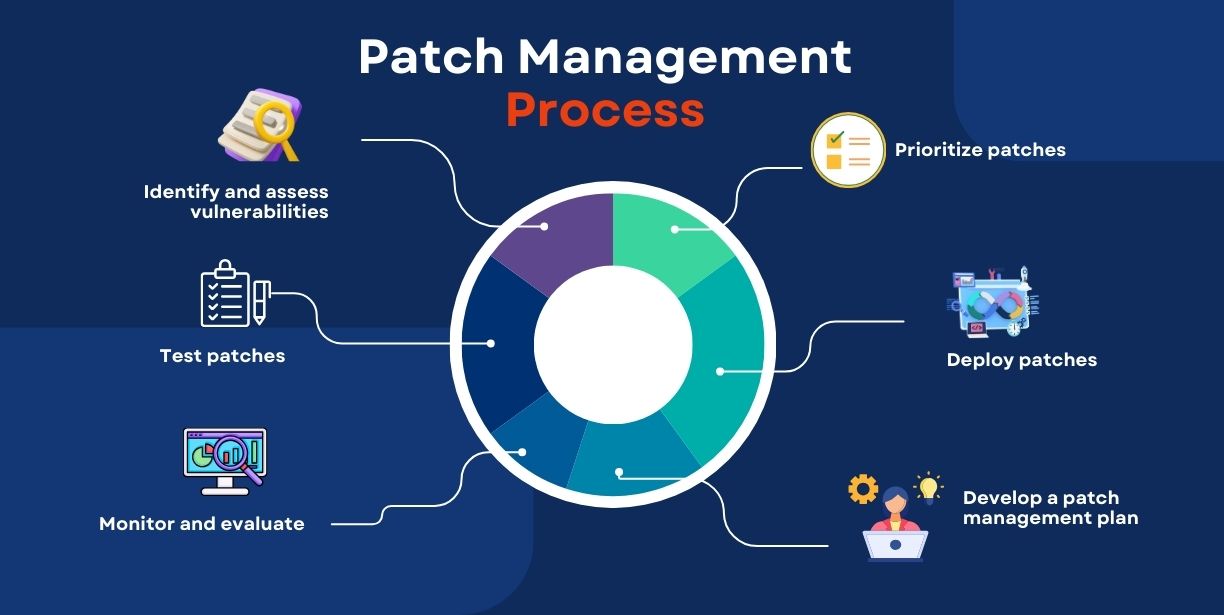
How Patch Management Works: The 7-Step Lifecycle
- Inventory. Know every device, operating system, and application, including third-party software.
- Monitor. Track vendor releases and known-exploited vulnerability lists.
- Assess and prioritize. Rank by severity, exploitation activity, and business impact.
- Test. Pilot patches on a small, representative group before wide release.
- Deploy. Roll out in stages during maintenance windows, with reboot control.
- Verify. Confirm patches installed, not just that they were scheduled.
Report and document. Keep records of exceptions, failures, and compliance status.
Patch Management Tools and Software
Good tools handle both operating system updates and third-party applications. Roundups note that attackers rarely care which layer they exploit, so third-party coverage matters as much as Windows updates.
| Category | Examples | Best for | Watch for |
|---|---|---|---|
| RMM-integrated patching | ConnectWise Automate, Datto RMM, NinjaOne, Syncro | MSPs that want patching, monitoring, and scripting in one place | Policies drift and exceptions pile up without regular review |
| Microsoft-native tools | Microsoft Intune, Windows Update, WSUS | Microsoft-centric shops, Windows-first endpoint and update management | Third-party app patching is a common gap |
| Dedicated patch platforms | ManageEngine Patch Manager Plus (1,100+ third-party apps), Automox (cloud-native, policy-based), Action1, Ivanti | Broad third-party coverage or mixed OS fleets | Another tool and bill to manage |
| Third-party app specialists | Patch My PC | Adding app patching to Intune or SCCM (integrates with Microsoft SCCM and Intune) | Doesn’t replace OS patching |
Vendor-stated figures (for example, app catalog sizes) change often, so verify them in a trial.
What to look for: OS coverage (Windows, macOS, Linux); third-party app catalog; automation and scheduling; reboot control; reporting and audit evidence; rollback; multi-client management; and PSA and ticketing integration.
Our view: the best tool is usually the one your team already knows, configured properly. TechPIO runs patch management inside the platform you already use, including ConnectWise Automate, Datto RMM, NinjaOne, and Syncro. Most “we need a new patching tool” problems are really policy and verification problems.
Types of Patch Management Software
| Type | How it works | Best for | Trade-off |
|---|---|---|---|
| Agent-based | A small agent on each device scans and installs patches | Remote and roaming devices | Agent deployment and upkeep |
| Agentless | Scans and deploys over the network | Locked-down or on-site servers | Weaker coverage for off-network devices |
| Cloud-native | Managed from the cloud, no on-prem server | Distributed teams, MSPs | Depends on internet and vendor |
| On-premises | Runs on your own servers (for example, WSUS) | Strict control or regulated environments | More infrastructure to maintain |
| OS-only | Windows, macOS, or Linux updates only | Simple environments | Misses third-party apps |
| OS + third-party | Adds browsers, Java, Adobe, and other apps | Most MSP clients | Catalog gaps need checking |
| RMM-integrated | Patching is one feature of the RMM | MSPs standardizing on one platform | Quality depends on configuration |
| Risk-based / vulnerability-driven | Prioritizes by exploitation and exposure | Teams overwhelmed by volume | Needs vulnerability data feeds |
Patch Management Best Practices
- Keep a complete asset inventory. You can’t patch what you can’t see.
Prioritize by exploitation, not just severity score. Verizon’s analysis says actively exploited vulnerabilities should come first, regardless of how old they are.
darkreading - Set written SLAs by severity. Example: actively exploited, within days; critical, within 14 days; everything else, within 30. Adjust to your clients’ risk and any compliance rules (PCI DSS sets one month as a ceiling for critical patches).
- Test in a pilot group first, then roll out in rings to avoid fleet-wide breakage.
Use maintenance windows and reboot control so patches finish without disrupting work. - Cover third-party applications, not just Windows.
- Plan for end-of-life systems. Decide on upgrade or ESU for every Windows 10 device, and document exceptions.
- Verify and report. Check that patches installed, and chase failures. “Scheduled” is not “done.”
Maintain an exceptions register with an owner and an expiry date for each. - Back up before major patch cycles, and know your rollback path.
- Automate, then audit. Review policies, failures, and exceptions monthly so they don’t drift.
- Pair patching with other controls: MFA, least privilege, hardening, EDR, and backups.
Common challenges
- Downtime and reboots: schedule windows per client and communicate in advance.
- Compatibility problems: pilot rings and a rollback plan.
- Remote and roaming devices: agent-based, cloud-managed patching.
- Legacy and line-of-business apps: isolate, document exceptions, and plan replacement.
- Alert fatigue and silent failures: report on failures and on devices that never checked in.
In-House vs. Outsourced Patch Management for MSPs
Doing it in-house gives you full control, but it takes technician time and a person who owns the process. Outsourcing makes sense when your team is stretched, patch reports are unreliable, or you’re growing faster than your processes.
TechPIO provides patch management as part of our RMM consulting services for MSPs, and the work can be white-label. We design patch policies and maintenance windows in your RMM, track exceptions, verify installs, and produce reports you can share with clients. We also support related services, including managed NOC, backup management, Microsoft 365 managed services, Azure consulting, and MSP staffing.
Want patching that actually finishes?
Book a free RMM audit. We review your patch policies, failures, and exceptions, and send back a ranked list of fixes.
Patch Management FAQs
What is patch management?
It’s the process of identifying, prioritizing, testing, deploying, and verifying software updates across devices and systems to fix security flaws and bugs.
Why is patch management important?
Unpatched systems are a leading way attackers get in. Verizon’s 2026 report found exploitation of vulnerabilities is now the most common initial access vector at 31%.
What are the steps in patch management?
Inventory, monitor, assess and prioritize, test, deploy, verify, and report.
How is patch management different from vulnerability management?
Vulnerability management finds and ranks weaknesses. Patch management deploys the fixes. Together they close the loop.
How often should you patch?
It depends on severity and exploitation. Routine updates often follow a monthly cycle, but actively exploited vulnerabilities should be patched much sooner, and compliance rules such as PCI DSS set outer limits for critical patches.
What are the types of patch management software?
Agent-based or agentless, cloud-native or on-premises, OS-only or OS plus third-party, RMM-integrated or standalone, and risk-based tools.
Is patching enough to stay secure?
No. Verizon’s data shows most privilege escalation incidents didn’t involve exploiting a CVE, so combine patching with identity, hardening, monitoring, and backups.
What should we do about Windows 10?
Decide on upgrading to Windows 11 or buying commercial ESU for each device. Commercial ESU Year 1 ends October 13, 2026, so confirm your renewal plan now.